
CSS Gradient: The Complete Guide to Creating Beautiful Gradient Backgrounds (2026)
Modern websites are no longer built with plain colors and static backgrounds alone. Designers and developers increasingly rely on CSS Gradient techniques to create visually appealing interfaces without using large image files. A well-crafted gradient can add depth, improve visual hierarchy, and make a website feel more modern while maintaining fast loading speeds.
A CSS Gradient is a background generated entirely with CSS code. Instead of displaying a single solid color, it smoothly blends two or more colors to create a seamless transition. Because gradients are rendered by the browser, they eliminate the need for separate background images in many situations. This can reduce HTTP requests, simplify website maintenance, and contribute to a cleaner frontend work flow.
In this guide, you’ll learn what CSS gradients are, how they work, the different types of gradients available, practical coding techniques, design best practices, common mistakes to avoid, and how gradients contribute to modern UI design and website performance. Whether you’re a beginner learning CSS or an experienced frontend developer looking to refine your design skills, this guide will provide practical knowledge you can immediately apply to your projects.
What Is a CSS Gradient?
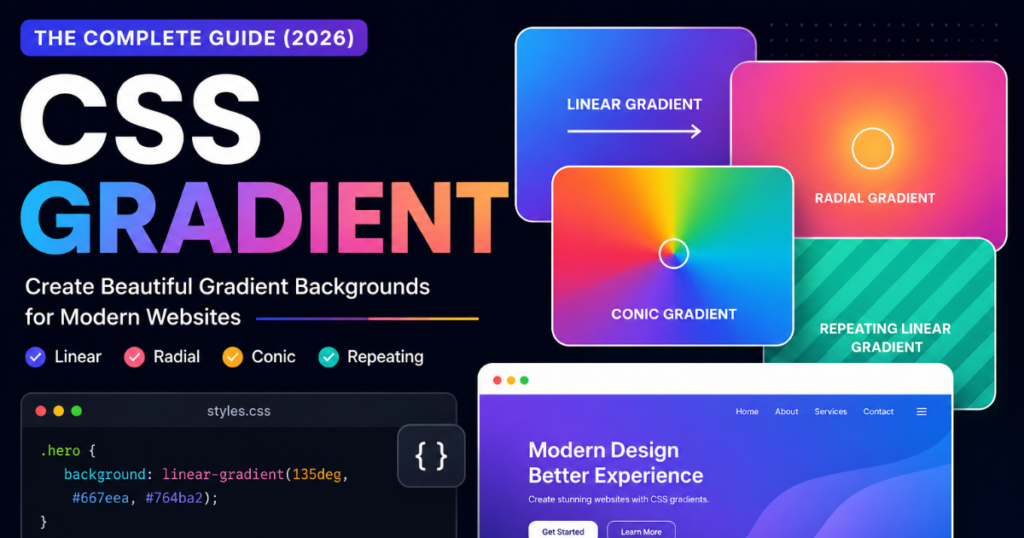
A CSS Gradient is a CSS-generated image that creates a smooth transition between two or more colors. Unlike traditional background images, gradients are produced directly by the browser using CSS functions, making them lightweight, scalable, and easy to customize.Instead of filling an element with one flat color, a gradient blends colors together gradually. Depending on the gradient type, the transition can move horizontally, vertically, diagonally, in circles, or even around a center point.For example, a website hero section may fade from deep blue at the top to light purple at the bottom. This effect is created entirely with CSS code, without requiring an external image.
How CSS Gradients Work
CSS gradients are generated using built-in CSS functions. When the browser reads these functions, it calculates how colors should blend and paints the background dynamically. Each gradient is defined by several properties, including Gradient type Direction or angle Starting colorEnding color Optional intermediate color stops Transparency values Because the browser renders gradients in real time, they remain sharp on all screen sizes and resolutions, from mobile phones to large desktop monitors.
CSS Gradient vs. Background Images.
Although gradients and images can both be used as backgrounds, they serve different purposes.
| Feature | CSS Gradient | Background Image |
|---|---|---|
| File Download | Not required | Required |
| Scalability | Infinite | Depends on image resolution |
| Performance | Lightweight | May increase page size |
| Customization | Easy with CSS | Requires image editing |
| Responsiveness | Excellent | May require multiple image sizes |
For many modern interfaces, gradients offer a cleaner and more efficient alternative to decorative background images.
Advantages of Using CSS Gradients
CSS gradients have become a standard part of modern frontend development because they provide several practical benefits.
Faster Website Performance
Since gradients are generated using CSS rather than downloaded as image files, they can help reduce page weight and minimize additional network requests.
Responsive by Default
Gradients automatically adapt to different screen sizes without losing quality, making them ideal for responsive web design.
Infinite Resolution
Unlike bitmap images, gradients never become pixelated. They remain crisp on high-resolution displays, including Retina and 4K screens.
Easy Customization
Developers can quickly modify:
- Colors
- Angles
- Direction
- Transparency
- Color stops
without opening external design software.
Cleaner Project Structure
Using CSS gradients reduces the need to manage separate image assets, helping keep project folders more organized.
Better Design Flexibility
Gradients can be combined with:
- Images
- Icons
- Patterns
- Animations
- Blur effects
- Shadows
to create modern and visually engaging interfaces.
Browser Support
One reason CSS gradients are widely adopted is their excellent browser compatibility. Modern browsers provide native support for gradient functions without requiring external libraries.
Current versions of major browsers—including Chrome, Edge, Firefox, Safari, and Opera—fully support linear, radial, and conic gradients. As a result, developers can confidently use gradients in production websites while following standard CSS syntax.
For legacy browser compatibility, it’s still good practice to define a solid background color before the gradient as a fallback. This ensures that users with very old browsers can still view readable content, even if advanced gradient features are unavailable.
By understanding how CSS gradients work and where they are most effective, you’ll be better prepared to create attractive, responsive, and performance-friendly web interfaces using only a few lines of CSS.
Types of CSS Gradients
CSS provides several gradient functions, each designed for different visual effects. Choosing the right type depends on the layout, design style, and user experience you want to achieve. Understanding these gradient types allows you to create backgrounds that are both attractive and functional.
1. Linear Gradient
A Linear Gradient CSS blends colors along a straight line. The transition can flow from top to bottom, left to right, diagonally, or at a custom angle.
This is the most commonly used gradient type because it is simple, flexible, and suitable for almost every website component.
Common use cases:
- Hero section backgrounds
- Landing pages
- Buttons
- Navigation bars
- Cards
- Call-to-action sections
Example CSS
.hero {
  background: linear-gradient(to right, #4f46e5, #06b6d4);
}
You can also define the direction using degrees.
.hero {
  background: linear-gradient(135deg, #7c3aed, #3b82f6);
}
Using angles provides greater creative control and is often preferred in modern UI design.
2. Radial Gradient
A Radial Gradient CSS begins from a central point and expands outward in a circular or elliptical shape.
Instead of moving in one direction, the colors spread evenly from the center, creating depth and focus.
Best for:
- Spotlight effects
- Circular backgrounds
- Product highlights
- Profile sections
- Decorative elements
Example CSS
.card {
  background: radial-gradient(circle, #ffffff, #3b82f6);
}
You can also position the center anywhere inside the element.
.card {
  background: radial-gradient(circle at top right, #fef3c7, #f59e0b);
}
Changing the center position creates unique lighting effects without additional graphics.
3. Conic Gradient
A Conic Gradient CSS rotates colors around a central point, similar to slices of a pie chart or a color wheel.
This gradient type is ideal for modern interfaces that require circular visual elements.
Popular applications:
- Progress rings
- Statistics dashboards
- Color wheels
- Decorative circles
- Infographics
Example CSS
.chart {
  background: conic-gradient(
    #22c55e,
    #3b82f6,
    #f97316,
    #22c55e
  );
}
Conic gradients can also begin from a custom angle.
.chart {
  background: conic-gradient(
    from 90deg,
    #ec4899,
    #8b5cf6,
    #06b6d4
  );
}
4. Repeating Linear Gradient
A Repeating Linear Gradient repeats the same color pattern continuously along a straight line.
Instead of ending after one transition, the pattern continues automatically.
Useful for:
- Decorative stripes
- Background textures
- Pattern overlays
- Section dividers
Example CSS
.pattern {
  background: repeating-linear-gradient(
    45deg,
    #2563eb 0px,
    #2563eb 20px,
    #60a5fa 20px,
    #60a5fa 40px
  );
}
5. Repeating Radial Gradient
A Repeating Radial Gradient creates repeating circular patterns radiating from the center.
It is often used for subtle textures and abstract backgrounds.
Example CSS
.pattern {
  background: repeating-radial-gradient(
    circle,
    #ffffff,
    #ffffff 12px,
    #dbeafe 12px,
    #dbeafe 24px
  );
}
This approach produces visually interesting effects while keeping the code lightweight.
CSS Gradient Comparison Table
| Gradient Type | Syntax | Direction | Best Use Case | Browser Support |
|---|---|---|---|---|
| Linear Gradient | linear-gradient() | Straight line | Hero sections, buttons, cards | Excellent |
| Radial Gradient | radial-gradient() | From center outward | Spotlights, highlights, backgrounds | Excellent |
| Conic Gradient | conic-gradient() | Around a center point | Charts, loaders, color wheels | Modern browsers |
| Repeating Linear Gradient | repeating-linear-gradient() | Repeating straight pattern | Stripes, textures | Excellent |
| Repeating Radial Gradient | repeating-radial-gradient() | Repeating circular pattern | Decorative backgrounds | Excellent |
CSS Gradient Syntax
CSS gradients are generated using built-in functions. While each function has its own syntax, they all follow the same basic idea: define a direction or shape, then specify the colors you want to blend.
Linear Gradient Syntax
background: linear-gradient(direction, color1, color2);
Example
background: linear-gradient(to right, #4f46e5, #06b6d4);
Linear Gradient with Multiple Colors
Adding more than two colors creates richer transitions.
background: linear-gradient(
  to right,
  #2563eb,
  #8b5cf6,
  #ec4899
);
Multiple color stops are useful for modern hero banners and landing pages.
Radial Gradient Syntax
background: radial-gradient(shape, color1, color2);
Example
background: radial-gradient(circle, #ffffff, #2563eb);
Conic Gradient Syntax
background: conic-gradient(color1, color2, color3);
Example
background: conic-gradient(
  #ef4444,
  #facc15,
  #22c55e,
  #3b82f6,
  #ef4444
);
Repeating Linear Gradient Syntax
background: repeating-linear-gradient(
  angle,
  color1,
  color2,
  color3
);
Repeating Radial Gradient Syntax
background: repeating-radial-gradient(
  circle,
  color1,
  color2
);
Choosing the Right Gradient
Each gradient type serves a different design purpose.
- Linear Gradient works best for clean website layouts and user interface components.
- Radial Gradient is ideal for creating focus and depth.
- Conic Gradient is perfect for circular graphics and modern dashboards.
- Repeating Gradients are useful for lightweight textures and decorative patterns.
Rather than using gradients only as backgrounds, consider applying them to buttons, icons, borders, overlays, and other interface elements. Thoughtful use of gradients can improve visual hierarchy while keeping your design modern, responsive, and efficient.
How to Create a CSS Gradient
Creating a professional CSS Gradient is easier than many beginners expect. With the right combination of colors, direction, and spacing, you can build modern backgrounds that improve the visual appeal of any website. Follow these practical steps to create responsive and attractive gradients.
Step 1: Choose a Purpose
Before selecting colors, decide where the gradient will be used.
For example:
- Hero section
- Website background
- Button
- Card
- Navigation bar
- Banner
- Call-to-action section
A gradient designed for a button may require stronger contrast than one used as a page background.
Step 2: Select a Harmonious Color Palette
Choose colors that complement each other instead of competing for attention.
Some popular combinations include:
- Blue → Purple
- Orange → Pink
- Green → Cyan
- Navy → Sky Blue
- Black → Dark Gray
Keeping the palette simple often creates a cleaner and more professional appearance.
Step 3: Choose the Right Gradient Type
Select the gradient style based on your design.
- Linear Gradient – Best for websites and buttons.
- Radial Gradient – Great for spotlight effects.
- Conic Gradient – Ideal for charts and circular UI elements.
- Repeating Gradient – Perfect for subtle textures and patterns.
Using the appropriate type ensures the gradient supports your design instead of distracting from it.
Step 4: Set the Direction or Angle
Direction changes how colors flow across an element.
Common options include:
to rightto leftto bottomto top45deg90deg135deg
Example
.hero{
    background:linear-gradient(135deg,#2563eb,#7c3aed);
}
Experiment with different angles to achieve a unique visual style.
Step 5: Add Multiple Color Stops
A gradient doesn’t have to be limited to two colors.
Adding three or four carefully selected colors creates richer transitions.
Example
.hero{
    background:linear-gradient(
        to right,
        #2563eb,
        #7c3aed,
        #ec4899
    );
}
Use additional color stops sparingly to maintain a clean design.
Step 6: Use Transparency
Transparency helps gradients blend naturally with images and other design elements.
CSS uses RGBA or HSLA values for transparent colors.
Example
.banner{
    background:linear-gradient(
        rgba(37,99,235,.9),
        rgba(124,58,237,.6)
    );
}
Transparent gradients work particularly well as overlays on hero images.
Step 7: Test Responsiveness
Always preview your gradient on multiple screen sizes.
Check it on:
- Desktop
- Laptop
- Tablet
- Mobile phone
A gradient that looks balanced on a large monitor may appear too dark or too bright on smaller screens.
Step 8: Maintain Accessibility
Visual appeal should never reduce readability.
Ensure that:
- Text remains easy to read.
- Buttons are clearly visible.
- Important content has sufficient contrast.
- Color combinations do not make information difficult to distinguish.
Accessibility improves the experience for all users.
Step 9: Optimize for Performance
CSS gradients are lightweight, but your overall design should also remain efficient.
Good practices include:
- Avoid unnecessary layers.
- Limit excessive gradient effects.
- Reuse gradient variables where possible.
- Keep your CSS organized.
A simple, optimized stylesheet is easier to maintain and performs well across devices.
Step 10: Review Before Publishing
Before launching your website, verify that the gradient:
- Matches your brand colors.
- Looks consistent throughout the site.
- Works in modern browsers.
- Doesn’t interfere with text readability.
- Enhances the design instead of overwhelming it.
Small adjustments can significantly improve the final result.
Practical CSS Gradient Examples
Simple Hero Background
.hero{
    background:linear-gradient(to right,#4f46e5,#06b6d4);
}
Button Gradient
.button{
    background:linear-gradient(90deg,#ec4899,#f97316);
    color:#fff;
    border:none;
    border-radius:8px;
}
Card Background
.card{
    background:linear-gradient(145deg,#ffffff,#f1f5f9);
}
Radial Background
.section{
    background:radial-gradient(circle,#ffffff,#93c5fd);
}
Conic Gradient
.chart{
    background:conic-gradient(
        #22c55e,
        #3b82f6,
        #f97316,
        #22c55e
    );
}
These examples demonstrate how just a few lines of CSS can create polished, modern visual effects.
Best Practices for CSS Gradients
Use Color Harmony
Select colors that naturally complement one another. Consistent palettes create a more professional and cohesive interface.
Maintain Strong Contrast
Background gradients should never make text difficult to read. Test headings, buttons, and links against the gradient to ensure good visibility.
Keep Layouts Simple
A clean gradient often has a greater visual impact than one with too many colors or effects. Simplicity improves usability and keeps the focus on your content.
Design for Mobile First
Gradients should look balanced on both small and large screens. Review your design on multiple devices before publishing.
Stay Consistent with Branding
If your brand uses specific colors, incorporate them into your gradients to strengthen visual identity across the website.
Use Gradients Purposefully
Gradients should support the interface, not distract from it. Apply them to highlight important areas such as hero sections, buttons, or featured content instead of every element on the page.
Test Across Browsers
Although modern browsers support CSS gradients well, it’s good practice to check your design in Chrome, Firefox, Safari, and Edge to ensure consistent rendering.
Organize Your CSS
Consider storing frequently used gradients in CSS custom properties (variables). This makes updates easier and keeps your stylesheet more maintainable.
:root{
    --primary-gradient:linear-gradient(135deg,#2563eb,#7c3aed);
}

.hero{
    background:var(--primary-gradient);
}
Using variables also promotes consistency throughout your project.
By following these techniques and best practices, you can create CSS gradients that are visually appealing, responsive, accessible, and efficient. A thoughtfully designed gradient enhances modern UI design while keeping your website lightweight and easy to maintain.
Common CSS Gradient Mistakes
CSS gradients can significantly improve a website’s appearance, but they can also reduce usability when applied incorrectly. The following are some of the most common mistakes developers and designers make, along with practical ways to avoid them.
Using Too Many Colors
A gradient containing five or six unrelated colors often looks distracting rather than professional. Excessive color transitions make it difficult for users to focus on the content.
Better approach:
- Use two or three complementary colors.
- Maintain a consistent color palette throughout the website.
- Reserve vibrant gradients for key sections only.
Poor Color Contrast
One of the biggest design mistakes is placing text over a gradient that doesn’t provide enough contrast. Visitors may struggle to read headings or call-to-action buttons.
How to fix it:
- Test your text against the background.
- Use darker overlays when necessary.
- Select text colors that remain readable across the entire gradient.
Choosing the Wrong Direction
A gradient direction that conflicts with the layout can make the design feel unbalanced.
For example, a left-to-right gradient may not complement a layout where the main content flows vertically.
Best practice:
Experiment with different angles such as:
- 90°
- 135°
- 180°
- 225°
Choose the option that naturally guides the viewer’s attention.
Ignoring Accessibility
A beautiful interface should also be accessible.
Avoid relying on color alone to communicate information. Users with visual impairments or color vision deficiencies should still be able to understand your content.
Always:
- Maintain sufficient contrast.
- Use readable typography.
- Avoid extremely bright color combinations behind text.
Overusing Gradients
Applying gradients to every button, card, section, and background can overwhelm visitors.
Instead, use gradients strategically to highlight important elements such as:
- Hero sections
- Primary buttons
- Feature banners
- Promotional cards
A balanced design creates a stronger visual impact.
Forgetting Browser Testing
Although modern browsers support CSS gradients well, rendering may vary slightly between browsers and devices.
Before publishing, test your design in:
- Google Chrome
- Mozilla Firefox
- Microsoft Edge
- Safari
Cross-browser testing helps ensure a consistent experience.
CSS Gradient Use Cases
CSS gradients are highly versatile and can enhance many parts of a website. Below are some of the most practical applications.
Website Backgrounds
Large background gradients create depth without increasing page size. They are commonly used on landing pages and homepage banners.
Hero Sections
Hero sections often use bold gradients to attract attention immediately while maintaining a clean and modern look.
Buttons
Gradient buttons naturally stand out from flat backgrounds and encourage user interaction when used appropriately.
Feature Cards
Cards with subtle gradients can visually separate important information while keeping the overall design lightweight.
Navigation Bars
A soft gradient applied to the navigation area helps establish brand identity without distracting from navigation links.
Text Effects
Modern browsers allow gradients to be applied directly to text using CSS clipping techniques, creating eye-catching headings.
Borders
Instead of plain borders, gradient borders can add elegance to cards, buttons, and profile sections.
Icons and Badges
Gradients make icons and status badges appear more dynamic while maintaining a consistent design language.
Best Free CSS Gradient Tools
Choosing the right tool can simplify the process of creating beautiful gradients. The following comparison highlights several popular options.
| Tool | Ease of Use | Live Preview | CSS Export | Color Customization | Best For |
|---|---|---|---|---|---|
| YTThumbsPro CSS Gradient Generator | Excellent | Yes | Yes | Advanced | Beginners & Professionals |
| CSS Gradient | Excellent | Yes | Yes | Advanced | Quick Gradient Creation |
| Coolors | Very Easy | Limited | Partial | Excellent | Color Palette Creation |
| uiGradients | Easy | Yes | Limited | Moderate | Ready-Made Gradients |
| ColorSpace | Easy | Yes | Yes | Good | Gradient Inspiration |
If you’re experimenting with different background styles, YTThumbsPro’s CSS Gradient Generator can be used to create responsive CSS gradients with live previews and export-ready CSS code for educational and design purposes, without making unrealistic performance claims.
CSS Gradient and Modern UI Design.
Gradients continue to play an important role in modern interface design because they create visual depth without adding unnecessary complexity.
Material Design
Material Design often combines gradients with clean layouts, rounded corners, and subtle shadows to create attractive user interfaces.
Glassmorphism
Glassmorphism uses translucent surfaces together with soft gradients to produce modern layered designs.
Combining blur effects and gradients creates elegant panels suitable for dashboards and landing pages.
Neumorphism
Neumorphism focuses on soft lighting and depth.
Gentle gradients help reinforce the illusion of raised or recessed interface elements.
Landing Pages
Landing pages frequently use gradient backgrounds behind headlines and call-to-action sections to capture attention without relying on large images.
Mobile Applications
Many mobile apps incorporate gradients into splash screens, onboarding pages, navigation bars, and buttons to establish a recognizable visual identity.
Dark Mode Interfaces
Gradients can soften dark backgrounds by introducing subtle color variation instead of using flat black or gray surfaces.
Modern Business Websites
Corporate websites increasingly use gradients to create a polished appearance while maintaining fast loading speeds and responsive layouts.
CSS Gradient and SEO
Although gradients are primarily a visual design feature, they can indirectly support search engine optimization by improving website performance and user experience.
Faster Loading Than Image Backgrounds
CSS gradients eliminate the need for many decorative background images.
Fewer image files often result in:
- Reduced page weight
- Faster rendering
- Lower bandwidth usage
These improvements contribute to a smoother browsing experience.
Better Core Web Vitals
Replacing large background graphics with lightweight CSS can help improve important performance metrics such as loading speed and visual stability.
Well-optimized pages are generally easier for users to interact with.
Improved User Experience
A clean and visually appealing interface encourages visitors to explore additional pages.
When users can quickly identify important content, navigation becomes more intuitive.
Reduced HTTP Requests
Each image typically requires a separate network request.
Using CSS gradients instead of decorative images can reduce these requests, simplifying page loading.
Mobile Optimization
CSS gradients scale naturally across different screen sizes without losing quality.
This makes them particularly suitable for responsive websites viewed on smartphones, tablets, laptops, and desktop computers.
Cleaner Frontend Development
Maintaining gradients directly within CSS keeps project files organized and simplifies future updates.
Developers can modify colors or styles without replacing image assets, making long-term maintenance more efficient.
While CSS gradients alone will not improve search rankings, combining lightweight design techniques with high-quality content, responsive layouts, and good accessibility practices creates a stronger overall user experience—an important goal for modern websites.
Frequently Asked Questions
1. What is a CSS Gradient?
A CSS Gradient is a background generated using CSS that smoothly blends two or more colors without requiring an image file.
2. Why should I use CSS gradients instead of images?
CSS gradients are lightweight, scalable, and easy to edit. They can reduce the need for decorative background images while keeping designs responsive.
3. What are the main types of CSS gradients?
The most common types are Linear Gradient, Radial Gradient, Conic Gradient, Repeating Linear Gradient, and Repeating Radial Gradient.
4. Which CSS gradient is best for beginners?
Linear gradients are generally the easiest to learn and work well for most website layouts.
5. Are CSS gradients responsive?
Yes. Since gradients are generated by the browser, they automatically adapt to different screen sizes without losing quality.
6. Do CSS gradients affect website performance?
When used appropriately, gradients are usually more lightweight than decorative image backgrounds and can contribute to a cleaner frontend.
7. Can I use more than two colors in a gradient?
Yes. CSS supports multiple color stops, allowing you to blend three or more colors smoothly.
8. Which browsers support CSS gradients?
Current versions of Chrome, Firefox, Edge, Safari, and Opera provide excellent support for standard CSS gradient functions.
9. Can gradients be animated?
Yes. Gradients can be combined with CSS animations and transitions to create dynamic visual effects.
10. How do I choose the right colors?
Start with a harmonious color palette that matches your brand and provides enough contrast for readable text.
11. What is a gradient angle?
A gradient angle controls the direction in which colors transition. Common values include 45°, 90°, 135°, and 180°.
12. Can I use transparency in gradients?
Yes. Using RGBA or HSLA color values allows you to create transparent gradient overlays for images and backgrounds.
13. Are CSS gradients suitable for dark mode?
Absolutely. Subtle gradients can add depth and improve the visual appeal of dark interfaces.
14. What is the difference between a linear and radial gradient?
A linear gradient blends colors along a straight line, while a radial gradient spreads colors outward from a central point.
15. Can gradients replace background images completely?
In many design scenarios, yes. However, photographs and detailed illustrations still require image files.
16. What tools can help create CSS gradients?
Online gradient generators, color palette tools, and browser developer tools make designing and testing gradients much easier.
17. Are gradients good for buttons?
Yes. Carefully designed gradient buttons can improve visual hierarchy and encourage user interaction.
18. Should every section of a website use gradients?
No. Overusing gradients can make a design feel cluttered. Use them selectively to highlight important content.
19. How can I improve accessibility with gradients?
Ensure sufficient color contrast, use readable typography, and test your design on different devices and screen settings.
20. Where can beginners practice CSS gradients?
Creating small demo projects, experimenting with browser developer tools, and using educational gradient generators are excellent ways to build practical experience.
Final Thoughts
CSS gradients have become an essential part of modern web design because they combine visual appeal with efficiency. Unlike traditional image backgrounds, gradients are generated directly through CSS, making them flexible, scalable, and easy to maintain.
Whether you’re designing a personal portfolio, a business website, a landing page, or a web application, understanding how to use gradients effectively can significantly improve the overall user experience. The key is to focus on thoughtful color selection, readability, accessibility, and consistency rather than adding visual effects simply for decoration.