
Character Counter: The Complete Guide to Counting Characters, Letters, and Text Statistics (2026)
Whether you’re writing a blog post, crafting a social media caption, preparing an academic assignment, or optimizing a webpage for search engines, keeping track of your text length is more important than many people realize. While word count often receives the most attention, character count plays an equally significant role in ensuring your content fits platform requirements and remains easy to read. This is where a Character Counter becomes an essential writing companion.A Character Counter is an online tool that instantly measures the number of characters in your text as you type or paste content. Most modern tools go beyond simple character counting by also providing word count, sentence count, paragraph count, reading time, speaking time, and other useful writing statistics. These real-time insights help writers edit more efficiently and stay within required limits.Character counting is especially useful for content that has strict length restrictions. Meta titles and meta descriptions for SEO, social media posts, email subject lines, advertisements, coding projects, and application forms often specify a maximum number of characters. Exceeding these limits may result in truncated text or formatting issues.
What Is a Character Counter?
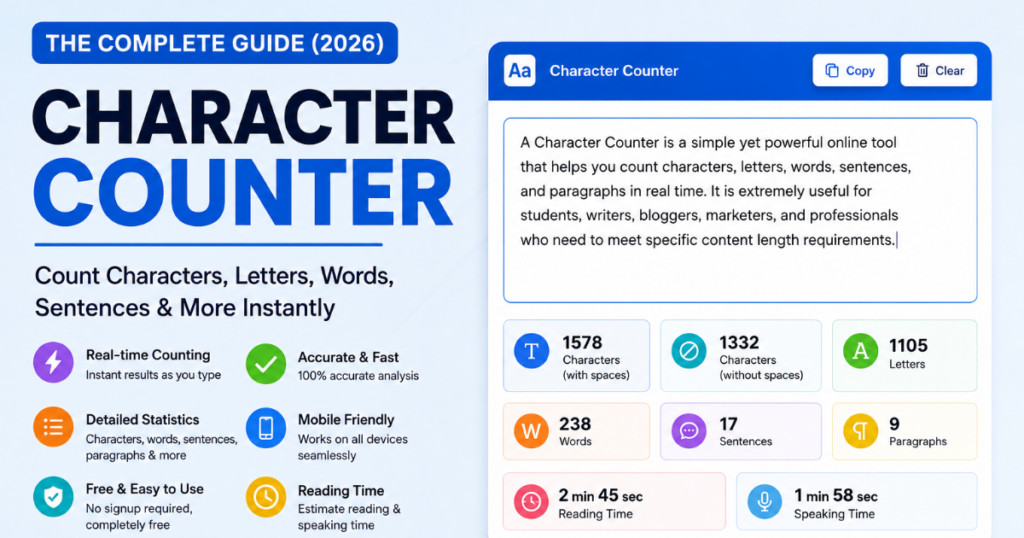
A Character Counter is a text analysis tool that calculates the total number of characters in written content in real time. Every letter, number, punctuation mark, symbol, and—depending on the selected option—space is counted automatically as text is entered or pasted into the editor.Unlike manual counting, which is slow and prone to errors, a Character Counter provides instant and accurate results. Most online tools continuously update the statistics while you type, making them ideal for tasks where precision is important.
The Purpose of a Character Counter
The primary purpose of a Character Counter is to help writers stay within specific text limits while improving the overall quality and organization of their content.
It enables users to:
- Track character count instantly
- Monitor writing progress
- Meet platform-specific character limits
- Edit content more efficiently
- Improve readability before publishing
Rather than focusing solely on the number of words, the tool provides a deeper understanding of the structure and length of your content.
How Does a Character Counter Work?
Modern Character Counter tools analyze text automatically using built-in algorithms.
As soon as you type, delete, or paste content, the tool scans the text and updates various statistics without requiring you to refresh the page or click a button.
Depending on the tool, you may see information such as:
- Total Characters
- Characters with Spaces
- Characters without Spaces
- Letter Count
- Word Count
- Sentence Count
- Paragraph Count
- Reading Time
- Speaking Time
Because calculations happen instantly, writers can make adjustments while drafting instead of reviewing everything at the end.ctical Applications of a Character Counter
A Character Counter is useful in many real-world situations across education, business, marketing, and content creation.
Academic Writing
Students often need to meet character or word limits for essays, reports, scholarship applications, and research summaries. A Character Counter makes it easy to check whether the content meets submission requirements.
Content Writing
Bloggers and website owners can use character statistics to refine introductions, headings, and summaries while maintaining readable and well-balanced content.
SEO Optimization
SEO professionals frequently monitor character limits for:
- Page titles
- Meta descriptions
- URL structures
- Social sharing snippets
Keeping these elements within recommended lengths improves how they appear in search results and on social media platforms.
Social Media Content
Different platforms have different character restrictions. A Character Counter helps creators prepare concise and readable captions, descriptions, and posts before publishing.
Business Communication
Professionals can use a Character Counter when writing:
- Email subject lines
- Product descriptions
- Advertisements
- Marketing copy
- Customer support messages
Maintaining the appropriate length improves clarity and helps communicate information more effectively.
Programming and Development
Developers may also use character counting when working with code comments, database fields, user input validation, or applications that require text length restrictions.
Why Accurate Character Counting Matters
Even small differences in text length can have a noticeable impact depending on where the content is published.
For example:A title that exceeds the available display space may be shortened.
- A social media caption may be cut off if it goes beyond the platform’s limit.
- An application form may reject text that exceeds the allowed character count.
- Long, unstructured content can reduce readability and make information harder to scan.
Using a Character Counter helps avoid these issues by providing accurate, real-time measurements before the content is submitted or published.
Instead of relying on guesswork, writers can make informed editing decisions based on precise text statistics.
Who Can Benefit from a Character Counter?
A Character Counter is suitable for anyone who works with text regularly, including:
- Students
- Bloggers
- Writers
- Journalists
- Copywriters
- SEO Professionals
- Digital Marketers
- Teachers
- Businesses
- Developers
- Content Creators
Whether you’re drafting a short social media update or preparing a long-form article, knowing your character count allows you to write with greater confidence and accuracy.
Why Use a Character Counter?
A Character Counter is much more than a simple counting tool. It helps writers, students, marketers, developers, and business professionals create content that meets specific character limits while improving readability and organization. Whether you’re writing a short social media post or a detailed article, knowing the exact number of characters can save time and reduce editing mistakes.
Below are some of the most common reasons why people use a Character Counter.
1. Academic Writing and Assignments
Many schools, colleges, and universities require assignments to meet specific character or word limits.
A Character Counter helps students:
- Stay within assignment guidelines
- Track writing progress
- Edit lengthy paragraphs
- Prepare scholarship applications
- Complete research summaries accurately
Instead of estimating text length manually, students receive precise statistics instantly.
2. Blog Writing
Professional bloggers often write content with a planned structure.
A Character Counter helps by ensuring:
- Headlines remain concise
- Meta titles stay within recommended limits
- Meta descriptions display properly
- Short introductions remain engaging
- Content maintains consistent formatting
Accurate character counting supports better readability and presentation.
3. SEO Content Optimization
Search engine optimization isn’t only about keywords—it also involves writing content that displays correctly in search results.
SEO professionals use Character Counter tools to optimize:
- SEO titles
- Meta descriptions
- URL slugs
- Social media snippets
- Product descriptions
Keeping these elements within recommended lengths improves the appearance of search listings and enhances user experience.
4. Social Media Content
Most social media platforms have character limitations.
Whether creating:
- Short announcements
- Marketing captions
- Promotional posts
- Professional updates
a Character Counter helps ensure the message fits within platform requirements without unnecessary editing after publishing.
5. Email Writing
Clear and concise communication is essential in business emails.
A Character Counter helps writers create:
- Short subject lines
- Professional introductions
- Concise responses
- Easy-to-read email content
Keeping messages appropriately sized increases readability and improves communication.
6. Programming and Software Development
Developers frequently work with character limits while designing applications.
Common examples include:
- Username restrictions
- Password requirements
- Database field limits
- Form validation
- Mobile application inputs
Accurate character counting supports better user experience and reduces validation errors.
7. Professional Documentation
Businesses create many types of written documents every day.
Examples include:
- Product specifications
- Reports
- Technical documentation
- Marketing copy
- Customer support content
A Character Counter helps maintain consistency across all written communication.
Practical Example
Imagine you’re preparing:
- A blog post
- A meta description
- A social media announcement
- An email newsletter
Without a Character Counter, you may spend time manually editing text after discovering it exceeds the limit.
With a real-time Character Counter, you immediately know:
- Total characters
- Characters with spaces
- Characters without spaces
- Word count
- Reading time
This saves time while improving writing accuracy.
Key Features of a Good Character Counter
Modern Character Counter tools provide far more than basic character counting. They analyze text instantly and present useful writing statistics that help users improve their content.
Below are the most valuable features to look for.
1. Character Count
The primary feature displays the total number of characters in the text.
Every:
- Letter
- Number
- Symbol
- Punctuation mark
is counted automatically.
2. Character Count with Spaces
Many platforms include spaces when calculating limits.
This feature counts:
- Letters
- Numbers
- Symbols
- Spaces
- Punctuation
It is especially useful for academic forms and social media platforms that measure total characters.
3. Character Count without Spaces
Some applications exclude spaces from their character limits.
This statistic counts only visible characters while ignoring blank spaces between words.
It is commonly used for technical documentation and certain online forms.
4. Letter Count
A Letter Counter calculates only alphabetic characters.
Numbers, spaces, and punctuation are excluded.
This feature is helpful for educational exercises and language-related analysis.
5. Word Count
Many Character Counter tools also include a built-in Word Counter.
This allows users to monitor:
- Total words
- Writing progress
- Assignment length
- Article size
without switching to another tool.
6. Sentence Count
Sentence Count helps writers understand how their content is structured.
It can assist with:
- Improving readability
- Breaking long paragraphs
- Editing complex writing
- Organizing information more clearly
7. Paragraph Count
Paragraph Count shows how many paragraphs are present in the text.
Well-organized paragraphs improve:
- User experience
- Visual appearance
- Reading comfort
- Content organization
8. Reading Time
Reading Time estimates how long it takes an average reader to finish the content.
This feature benefits:
- Bloggers
- Journalists
- Teachers
- Content marketers
who want to create reader-friendly articles.
9. Speaking Time
Speaking Time estimates how long the text will take to read aloud.
It is useful for:
- Presentations
- Speeches
- Podcasts
- Video scripts
- Public speaking practice
10. Copy Text
A built-in Copy button allows users to copy the analyzed text with a single click.
This improves productivity and reduces unnecessary steps during editing.
11. Clear Text
The Clear feature instantly removes all text from the editor.
Instead of manually deleting large amounts of content, users can start fresh with one click.
12. Live Text Analysis
One of the most valuable features is real-time analysis.
As users type, delete, or paste text, statistics update instantly without requiring page refreshes or manual calculations.
This immediate feedback helps writers make adjustments while drafting.
13. Mobile-Friendly Interface
A responsive Character Counter works smoothly across:
- Smartphones
- Tablets
- Laptops
- Desktop computers
This flexibility allows users to analyze text from virtually any device.
How Does a Character Counter Work?
Although Character Counter tools appear simple, they perform multiple calculations simultaneously to deliver instant and accurate text statistics.
Below is a step-by-step explanation of how the process works.
Step 1
Open the Character Counter tool in your web browser.
Step 2
Type directly into the editor or paste existing text.
Step 3
The tool immediately detects every character entered.
Step 4
It separates letters, numbers, punctuation, and spaces for accurate counting.
Step 5
The system calculates the total number of characters in real time.
Step 6
Additional algorithms identify individual words within the text.
Step 7
Sentences and paragraphs are detected based on punctuation and line breaks.
Step 8
Reading time and speaking time are estimated using average reading and speaking speeds.
Step 9
All statistics refresh automatically whenever the text changes.
Step 10
Users can copy, edit, clear, or continue refining their content while monitoring updated statistics without interruption.
Modern Character Counter tools complete all these calculations within milliseconds, allowing writers to focus on creating high-quality content instead of manually measuring text length.
Benefits of Using an Online Character Counter
An online Character Counter is more than a convenience tool—it helps improve writing accuracy, save time, and create content that meets platform-specific requirements. Whether you’re drafting a blog post, writing a social media caption, or preparing a professional document, instant text analysis can make the writing process more efficient.
Below are the key benefits of using an online Character Counter.
1. Saves Time
Manually counting characters is impractical, especially for long documents.
A Character Counter performs calculations instantly, allowing you to focus on writing instead of measuring text length. This is particularly useful when working with multiple documents or editing content under tight deadlines.
2. Improves Productivity
Real-time statistics eliminate the need to switch between different tools.
Instead of checking character count, word count, reading time, and sentence count separately, everything is available in one place. This streamlined workflow helps writers complete projects more efficiently.
3. Helps Meet Character Limits
Many platforms enforce strict character restrictions.
Examples include:
- Search engine meta titles
- Meta descriptions
- Social media posts
- Email subject lines
- Online application forms
- Advertising copy
A Character Counter helps ensure your content fits within these limits before publishing or submitting.
4. Enhances Readability
Well-structured writing is easier to understand.
By monitoring:
- Sentence count
- Paragraph count
- Word count
- Reading time
writers can identify sections that may need simplification or better organization.
5. Supports SEO Writing
SEO involves more than keyword placement. Search snippets, titles, and descriptions should also remain concise and informative.
A Character Counter helps optimize:
- SEO titles
- Meta descriptions
- Social media previews
- Short product descriptions
Keeping these elements within recommended lengths improves their presentation across search results.
6. Reduces Editing Errors
Without accurate statistics, writers often spend additional time trimming or expanding content.
Real-time analysis allows you to make small adjustments during the writing process rather than rewriting large sections later.
7. Improves Content Quality
Knowing the structure of your content encourages better organization.
Writers can quickly evaluate whether:
- Paragraphs are balanced
- Sentences are too long
- Text flows naturally
- Important ideas are presented clearly
The result is content that is easier for readers to follow.
Character Count vs Word Count
Although Character Count and Word Count are related, they serve different purposes. Understanding the difference helps you choose the right measurement for your writing goals.
| Feature | Character Count | Word Count |
|---|---|---|
| Definition | Counts every character, including letters, numbers, punctuation, and optionally spaces | Counts the total number of words |
| Primary Purpose | Measures text length precisely | Measures document size and writing progress |
| Best Use Cases | Meta titles, descriptions, forms, social media, coding | Articles, essays, blogs, books, assignments |
| SEO Importance | Helps optimize search snippets and metadata | Helps maintain comprehensive content structure |
| Example | “Hello World” = 11 characters (without space) or 12 (with space) | “Hello World” = 2 words |
When Should You Use Character Count?
Character Count is ideal for situations where space is limited, such as:
- Search engine snippets
- App interfaces
- SMS messages
- Social media captions
- Form fields
- Product titles
When Should You Use Word Count?
Word Count is more useful for:
- Blog articles
- Academic essays
- Reports
- Research papers
- Books
- Website content
Most professional writers monitor both character count and word count to create well-balanced content.
Who Should Use a Character Counter?
A Character Counter is valuable for anyone who creates or edits written content. Different users benefit in different ways depending on their goals.
Students
Students often work within assignment guidelines that specify minimum or maximum text lengths.
A Character Counter helps them:
- Meet submission requirements
- Organize essays
- Edit research papers
- Improve writing accuracy
Bloggers
Bloggers use Character Counters to optimize:
- Headlines
- Meta descriptions
- Article summaries
- Social sharing text
These small improvements contribute to better content presentation.
Writers
Authors and freelance writers benefit from instant writing statistics while drafting articles, books, newsletters, and creative content.
The tool also helps track writing progress during long-term projects.
Journalists
News articles often require concise and accurate writing.
A Character Counter supports journalists by helping them write clear headlines and well-structured stories that fit publication requirements.
Copywriters
Marketing copy frequently has strict length limitations.
Examples include:
- Advertisements
- Landing pages
- Email campaigns
- Product descriptions
- Promotional banners
Character counting ensures copy remains concise without losing its intended message.
SEO Professionals
SEO specialists use Character Counters to optimize:
- Meta titles
- Meta descriptions
- URL slugs
- Rich snippets
- Search previews
Accurate text length contributes to a better search appearance and user experience.
Developers
Developers often implement character limits in software applications.
Examples include:
- Registration forms
- Username fields
- Password validation
- Database entries
- Mobile applications
A Character Counter helps verify that input meets predefined requirements.
Digital Marketers
Marketing teams regularly create content for multiple platforms.
A Character Counter allows them to prepare:
- Email campaigns
- Social media posts
- Advertisements
- Promotional content
while maintaining consistency across channels.
Businesses
Organizations use Character Counters when producing:
- Product listings
- Company profiles
- Customer support documentation
- Marketing materials
Consistent text length improves professionalism and readability.
Teachers
Educators can recommend Character Counter tools to help students:
- Practice concise writing
- Follow assignment instructions
- Develop editing skills
- Understand text structure
How Character Counting Helps SEO
While search engines do not rank pages based solely on character count, managing text length effectively contributes to better optimization and a stronger user experience.
1. Optimized Meta Titles
A concise title is easier to read in search results.
Using a Character Counter helps ensure important information appears without unnecessary truncation.
2. Better Meta Descriptions
Meta descriptions should summarize page content clearly while remaining within an appropriate length.
Monitoring character count allows you to create descriptions that are informative and reader-friendly.
3. Cleaner URLs
Short, descriptive URLs are generally easier to understand and share.
Although URL structure depends on multiple factors, keeping slugs concise improves readability.
4. Improved Readability
Balanced paragraphs and appropriately sized headings make content easier to scan.
When combined with sentence and paragraph analysis, Character Counters help writers produce more accessible content.
5. Better User Experience
Readers appreciate content that is clear, organized, and easy to navigate.
Monitoring text statistics encourages writers to simplify unnecessary wording and improve overall clarity.
6. Helpful Content Creation
Search engines increasingly reward content that answers user questions effectively.
Instead of writing simply to reach a certain length, use Character Count and other writing metrics to refine structure while focusing on delivering genuine value.
7. Supports Content Consistency
Maintaining similar title lengths, descriptions, and formatting across your website creates a more professional appearance.
Consistency also helps strengthen your overall content strategy.
Key Takeaway
A Character Counter should be viewed as a writing assistant rather than just a counting tool. It provides valuable insights that help improve organization, readability, SEO preparation, and writing efficiency—allowing you to focus on producing high-quality content for your audience.
(FAQs)
1. What is a Character Counter?
A Character Counter is an online tool that measures the total number of characters in a piece of text. Many tools also provide additional statistics such as word count, sentence count, paragraph count, and estimated reading time.
2. Why should I use a Character Counter?
It helps you stay within character limits for search engine snippets, social media posts, application forms, email subject lines, and other content where length matters.
3. Does a Character Counter count spaces?
Most Character Counter tools provide two separate measurements:
- Characters with spaces
- Characters without spaces
This allows users to meet different platform requirements.
4. Is a Character Counter useful for SEO?
Yes. It helps optimize SEO titles, meta descriptions, and other elements that often have recommended character ranges, making content easier to display in search results.
5. What’s the difference between character count and word count?
Character count measures every individual character, while word count measures the total number of words. Both metrics are useful for different writing tasks.
6. Can students benefit from using a Character Counter?
Absolutely. Students can monitor assignment limits, improve essay structure, and ensure submissions meet academic guidelines.
7. Do Character Counter tools work in real time?
Yes. Modern tools update statistics instantly as you type, delete, or paste text, providing immediate feedback.
8. Can I use a Character Counter on my mobile phone?
Most online Character Counter tools are responsive and work on smartphones, tablets, laptops, and desktop computers without requiring installation.
9. Is there a limit to the amount of text I can analyze?
The limit depends on the specific tool. Many online Character Counter tools support large amounts of text, making them suitable for articles, reports, and other long-form documents.
10. What types of writers use Character Counter tools?
These tools are useful for:
- Bloggers
- Students
- Journalists
- Copywriters
- SEO professionals
- Developers
- Digital marketers
- Business professionals
11. Can a Character Counter improve readability?
While it doesn’t rewrite content, it provides useful statistics that help writers organize text more effectively and identify areas that may need editing.
12. Is a Character Counter different from a Text Analysis Tool?
Yes. A Character Counter focuses primarily on measuring text length, while a Text Analysis Tool may also evaluate readability, keyword usage, grammar, or writing style.
13. Why is character counting important for social media?
Many social media platforms have character restrictions. Monitoring text length helps ensure your entire message is displayed without being cut off.
14. How does character counting help businesses?
Businesses use Character Counter tools when creating advertisements, product descriptions, email campaigns, website content, and customer communications to maintain clear and concise messaging.
15. Does a Character Counter calculate reading time?
Many modern Character Counter tools include estimated reading time and speaking time based on average reading and speaking speeds.
16. Can developers use Character Counter tools?
Yes. Developers often use character counting to validate user input, test form fields, and work with database character limits.
17. Is online character counting secure?
Most browser-based Character Counter tools process text directly within the browser session. However, avoid pasting sensitive or confidential information into any online tool unless you trust the service and understand its privacy practices.
18. Can I copy my analyzed text after checking it?
Most Character Counter tools include a Copy button that allows users to copy their edited content quickly.
19. How often should I check character count while writing?
Checking in real time helps you stay within required limits and reduces the need for major edits before publishing or submitting your work.
20. Can I use YTThumbsPro’s Character Counter for educational purposes?
Yes. YTThumbsPro’s Character Counter can be used to analyze characters, words, sentences, paragraphs, and estimated reading time for writing, editing, learning, and content optimization purposes without making unrealistic performance claims.
Final Thoughts
A Character Counter is much more than a simple counting utility. It is a practical writing assistant that helps improve organization, accuracy, and efficiency across a wide range of writing tasks.
Whether you’re preparing an academic assignment, publishing a blog post, creating marketing copy, or optimizing content for search engines, understanding your text statistics can make the editing process faster and more precise.
Rather than focusing only on reaching a specific character count, aim to create content that is clear, well-structured, and genuinely useful for readers. Character limits should guide your editing decisions—not define the quality of your writing.